Your post-purchase survey is live. Customers are answering it at checkout. Good.
But what about the 40,000 people on your email marketing list who haven’t bought recently? Or your top customers whose opinions you’ve never actually asked for? Or the lapsed buyers who stopped purchasing three months ago, and you have no idea why?
A checkout survey only catches people at one moment. Everyone else goes unheard.
Most brands stop at checkout and call it a feedback strategy. The customer feedback they’re missing on product ideas, buying barriers, audience interests, and channel discovery is sitting right there in their email list. They just haven’t asked.
This is the checkout-only problem. And it’s why survey link delivery exists.
What sending a survey via email actually means
The phrase “embedded email surveys” gets used loosely, so it’s worth being clear on what actually works. For brands doing serious market research beyond the checkout moment, the distinction matters.
True in-email embedding, a full interactive form that lives in the email body and submits without leaving the inbox, isn’t reliably possible at scale. Gmail, Outlook, and most major email clients strip the HTML code that makes forms function. What renders in one client breaks in another. Functionality disappears.
What works in practice is link-based delivery. You drop a survey link into your email, the customer clicks, and they land on a dedicated survey page. No rendering issues, no broken forms, no compatibility problems.
You don’t need a special email template or embed code.
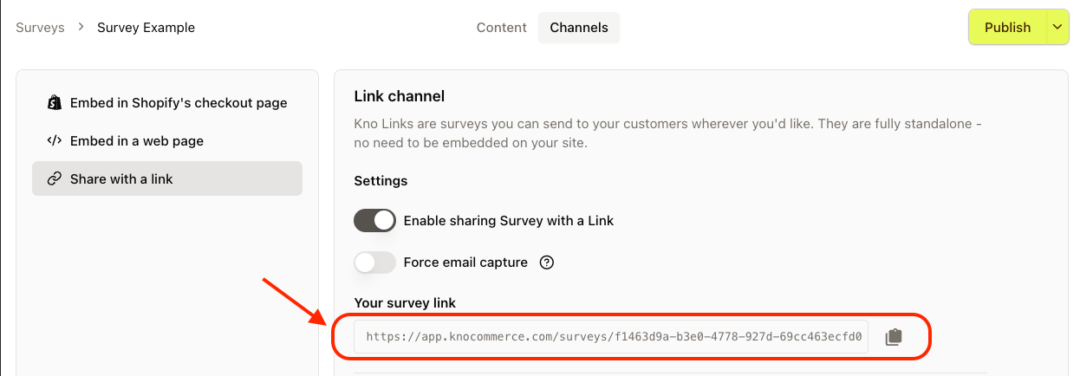
KnoCommerce generates a unique URL for every survey you build. Copy it, drop it into any email, send. Survey responses come back tied to customer profiles automatically.
When to use an email marketing survey
Not every survey question belongs at checkout. Some of the most valuable research you can do requires a different moment or a different audience entirely.
Use email delivery when:
Customers bought weeks or months ago and their experience with the product is more formed. An NPS (net promoter score) survey sent 30 to 60 days after purchase captures a more honest opinion than one sent right after checkout. A skincare brand asking which products they’ve repurchased and why will get far more useful customer satisfaction data than anything collected in the moment.
Lapsed buyers stopped purchasing and you don’t know why. A supplement brand can learn whether price, taste, or shipping drove cancellation without leading with a sales ask. The answer shapes the follow-up.
Your best customers deserve questions that go beyond their order history. What they watch, what brands they love, what’s on their radar. That kind of audience intelligence shapes ad targeting, partnerships, and positioning in ways purchase data never could.
A product idea needs validation before you commit to production. Sending one embedded question to a segment of recent buyers is faster and cheaper than guessing. If the signal is weak, you know before you’ve ordered thousands of units.
Stick with checkout surveys when:
You need immediate post-purchase attribution. That window closes fast, and an email a few days later won’t capture the same data.
Your audience is cold or disengaged. Survey emails sent to low-engagement segments hurt deliverability and return noisy data from people with no real relationship to your brand.
How to set it up in KnoCommerce
Getting a survey link live takes a few minutes:
- Build your survey in the Survey Builder. Choose your question types, multiple choice, star ratings, rating scale, or an embedded survey format, whatever fits the use case.
- Go to the Channels section and click “Share with a link”
- Toggle on “Enable sharing Survey with a Link” and copy the URL
- Hit Publish
That link works anywhere. A Klaviyo flow, a Customer.io broadcast, a receipt email, a loyalty confirmation, a QR code on packaging. No platform lock-in.
Tying responses to customer profiles
An anonymous response tells you what respondents think in aggregate. A response tied to a profile tells you what a specific person thinks and lets you act on it.
The cleanest way to connect survey responses to profiles is passing the customer’s email through the survey URL. In Klaviyo, append ?email={{email}} to the end of your KNO survey URL. In Customer.io, it’s ?email={{customer.email}}. Most ESPs support the same pattern. If you’re syncing back to a CRM, check your platform’s documentation or reach out to KNO’s support team to confirm the right format.
Klaviyo pulls the email from the profile automatically and passes it through. When someone clicks, KNO receives the email alongside the response and ties both to the customer record in real-time. No manual matching, no gaps.
If your use case calls for anonymous responses, concept testing, cold lists, broad research, that works too.
Just know the tradeoff: aggregate data only, no segmentation, no triggered flows downstream.
What to do with the data
Collecting responses is step one. What you build from them matters more.
When responses sync back into your ESP as profile properties, your automation can act on what customers told you. Someone who says they stopped buying because of price gets a discount flow. A customer who flags a shipping issue gets flagged for follow-up. A buyer who expresses interest in a new product category gets added to a pre-launch segment before you’ve announced anything.
This is where segmentation gets useful. Instead of sending the same campaign to your entire list, you’re sending the right message to the right person based on something they actually told you. A lapsed customer who said they’d buy again if shipping were cheaper responds differently to an offer than one who said they never found a product they wanted. The survey tells you which is which.
It compounds over time too. Each send adds more profile data, sharpening your metrics and giving you a fuller picture of the customer experience, making the next campaign more targeted. Brands that run email surveys consistently end up with a clearer picture of their customer base than brands relying on purchase history alone.
The survey stops being a research exercise and starts being infrastructure.
Email survey best practices before you hit send
List hygiene matters. Sending survey emails to segments you haven’t contacted in a while can spike unsubscribe rates. Clean your list first.
Response rates are also worth thinking about before you send. A shorter survey with a strong first question, something low-friction like multiple choice or star ratings, consistently outperforms long-form sends. Keep the formatting clean and test on mobile devices before you go out.
Don’t pass an email parameter in the URL for anonymous surveys. That combination creates display errors. Decide upfront whether you want identified or anonymous responses before you configure the link.
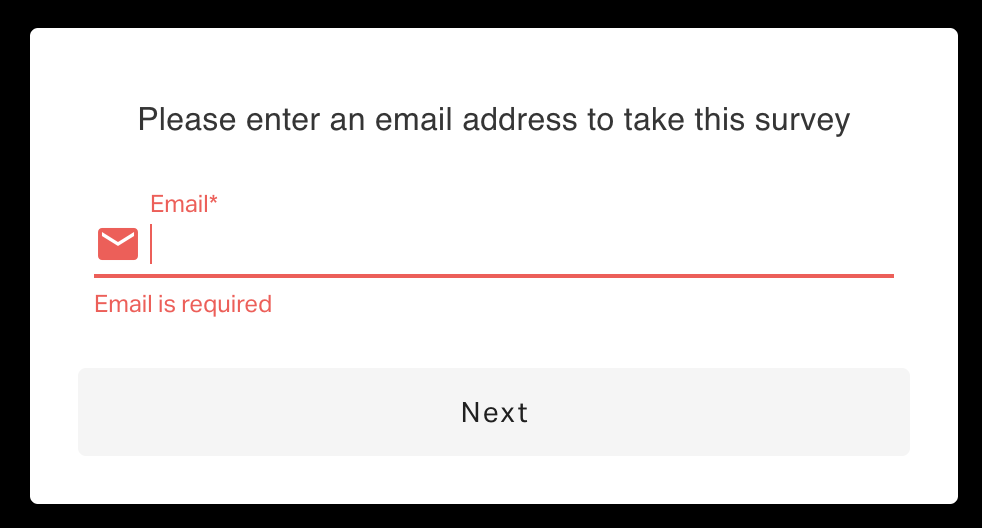
Forcing email capture adds a step for the customer. For most use cases the data quality is worth it, but for short research sends to cold audiences, anonymous delivery with an optional email question at the end is cleaner.
Time it based on behavior. For customer satisfaction, 30 to 60 days after delivery. For attribution, soon after a first purchase, when the experience is fresh. For product research, after someone has used the product enough to have a real opinion.
Start with one question
Pick your highest-value customer segment. Ask them something you genuinely don’t know the answer to. See what comes back.
The setup takes less than ten minutes. The data, when you act on it, compounds.
Book a demo to learn more!